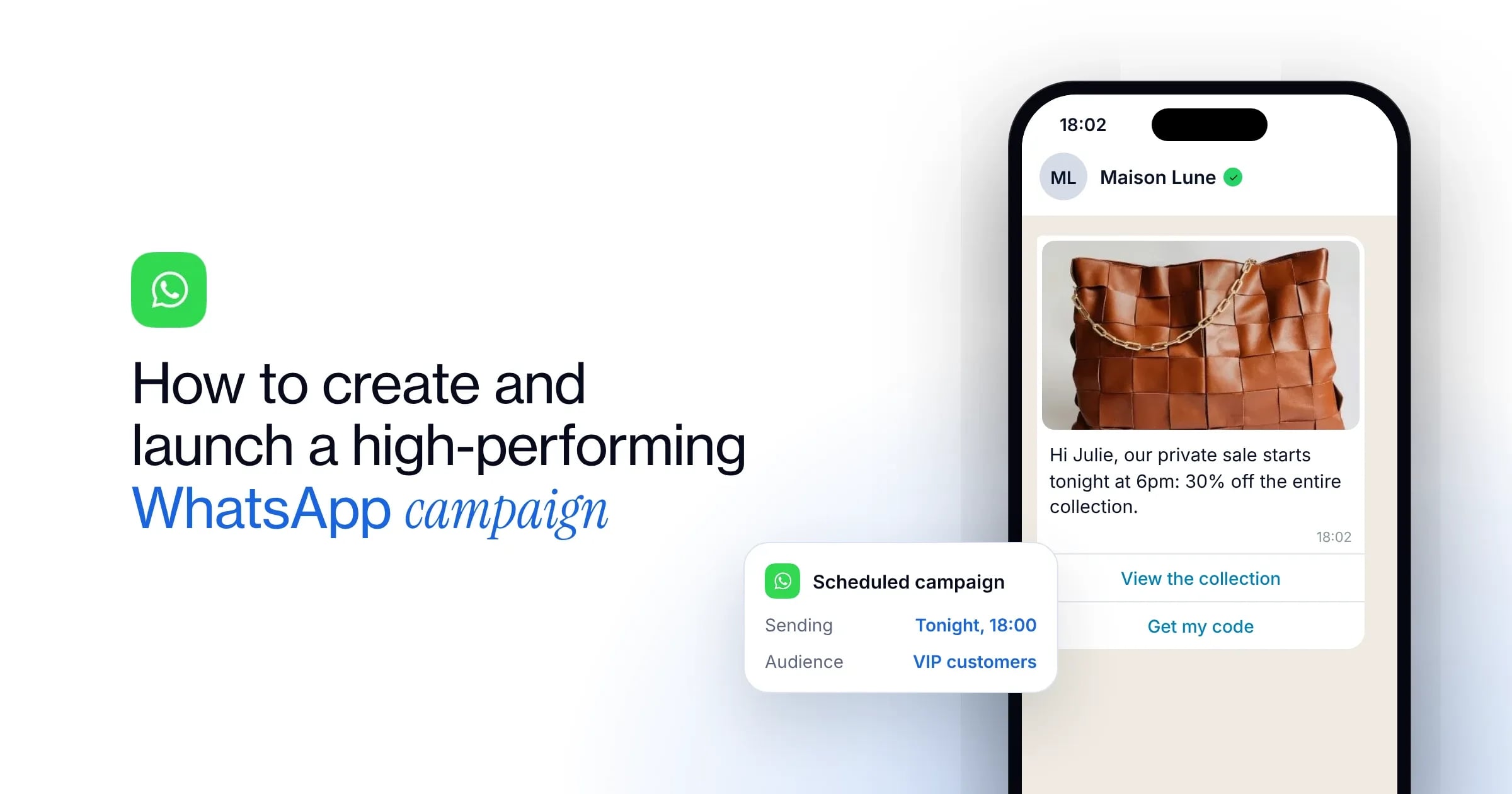
WhatsApp campaigns: create, launch and make every send count
Enora Le NozaihGrowth Lead
12 min
Open rates of up to 98% and record engagement: WhatsApp campaigns have become the channel of choice for businesses that want to promote their products to their customers and keep them loyal.
With the WAX platform, running every campaign becomes simple and intuitive. You segment your contacts, send rich messages and handle replies with ease. To inspire your next sends, here are our campaign examples and best practices to boost your performance.
Why run marketing campaigns on WhatsApp?
With 3 billion monthly active users, WhatsApp lets you reach a responsive, loyal and engaged audience. Its rich formats and conversational nature create an immediate sense of closeness with your recipients. On average, people interact with a message within just seven minutes (compared with 20 hours for email).
Far more interactive than traditional SMS, the channel lets businesses promote targeted offers, enrich the customer experience and drive sales. To learn more about its benefits, Meta’s rules and how this messaging app works, read our complete guide to WhatsApp marketing.
How to launch a WhatsApp campaign with WAX
Step 1: Collect your recipients’ consent
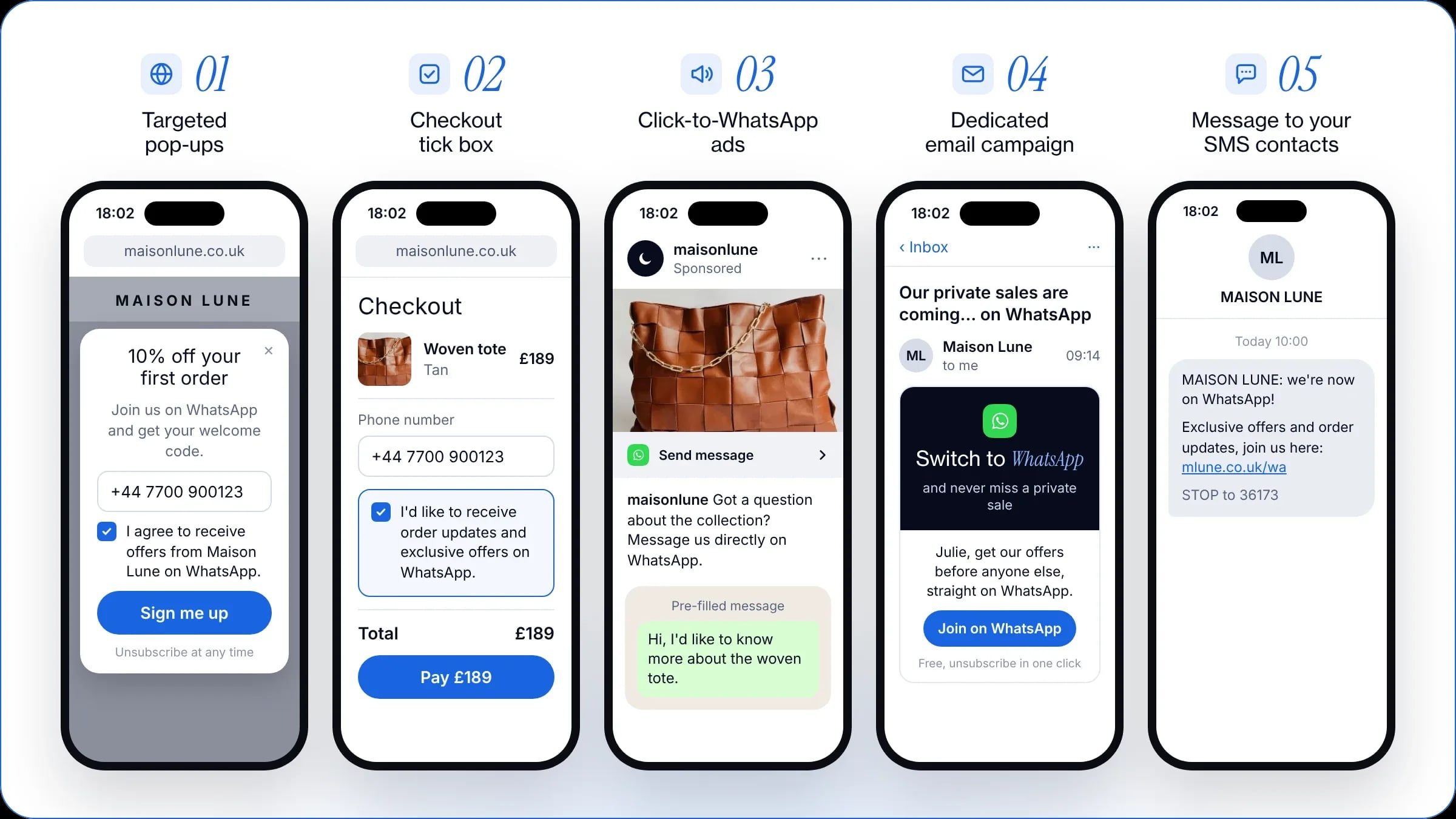
Before you send your first campaign, you must obtain your users’ explicit consent (opt-in). An SMS opt-in is not a WhatsApp opt-in, however: you need a new agreement. Launching WhatsApp therefore means building a new contact list. To do so, you can use several complementary levers.
Online, rely on:
Targeted pop-ups on your website (invite visitors to sign up while they browse, for example with a welcome pop-up)
A checkbox at checkout (offer order tracking or exclusive offers straight on WhatsApp)
Click-to-WhatsApp ads (run ads on social media that open a WhatsApp conversation in one tap)
A dedicated email campaign (send your current subscribers to WhatsApp with a direct link)
A message to your SMS list (send an SMS announcing your presence on WhatsApp and bring existing contacts over)
In store, collect consent at the till or through QR codes on your packaging, receipts and marketing materials.
Always send a WhatsApp welcome message as soon as you get a new opt-in. It eases the user into the channel and ensures the very first message they receive is not a promotion sent several months later.
Step 2: Segment your contacts
Once your list is built, avoid sending the same message to everyone on it. Generic sends seriously hurt your performance and degrade the customer experience.
Keep WhatsApp for your most loyal and engaged customers, and create precise segments. For example, you can connect the WAX platform directly to your online store to target recent buyers, customers with a high average order value, and so on.
You can also segment by how responsive your recipients are: if a contact never reacts to your WhatsApp campaigns, remove them from that segment and test their response on another channel, such as RCS.
Step 3: Write a compelling message
On WhatsApp, write fluid, well-spaced copy that, above all, matches your brand’s tone of voice. Personalise your message with dynamic variables, and add visuals (images, videos, product carousels) to enrich your content.
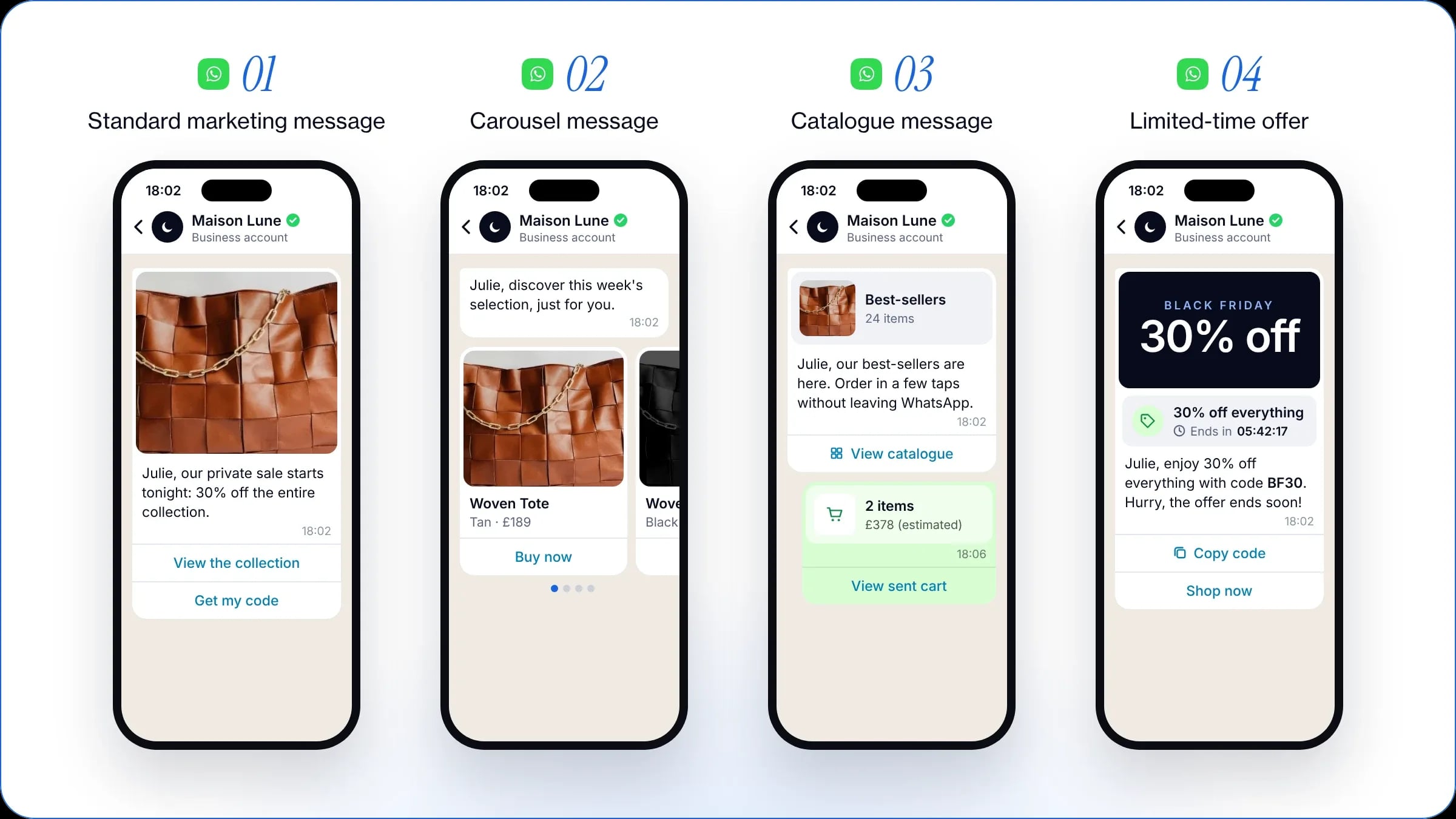
To maximise engagement and conversions, the WhatsApp Business API offers several types of message:
Standard marketing message: it combines text, media and interactive buttons. Choose a portrait or square visual and limit yourself to two or three precise action buttons.
Carousel message: it lets users scroll horizontally through up to ten cards, each with an image, a description and its own button. Put your best-sellers on the first cards to encourage people to explore the rest of the selection.
Catalogue message: synced with your online store, it lets users browse your products and order without leaving the app. Choose targeted, attractive selections, such as your best-sellers or new arrivals.
Limited-time offer message: it highlights a promo code with an expiry date to create a sense of urgency during a key sales moment. Keep this format for short operations (usually a few days).
Whatever the format, always send a real test to your own smartphone before the campaign goes out. On mobile, WhatsApp automatically cuts off long texts around the fifth line and adds “Read more”. Always structure your opening so that the key information is visible straight away.
To make the customer journey smoother, then choose the buttons best suited to your goal:
Website button (URL): it takes the user to an external page (product page, basket, online store). Use it whenever your main goal is direct conversion and getting people to your store.
Quick reply button (Quick Reply): it lets the recipient send a pre-filled reply in one tap, without typing. Use it to trigger an automated journey or to segment your customers’ preferences.
Copy code button (Copy Code): it copies the promo code straight to the smartphone’s clipboard. Use it for private sales, abandoned basket reminders and more.
Call button (Click-to-Call): it dials your business’s number instantly. Keep it for very high order values, appointment bookings or urgent support needs.
Step 4: Get your template approved by Meta
Once your message is written, Meta must approve it before it is sent: approval takes two to three minutes on average. To get your WhatsApp marketing campaign approved quickly, follow the WhatsApp Business API’s messaging rules to the letter.
To make this step easier and faster, the WAX platform provides ready-to-use message templates, designed specifically to be approved by Meta without difficulty.
Step 5: Schedule the send for the best moment
Choosing the right time slot is essential to get the most out of your WhatsApp marketing campaign. Send your offers when your recipients are most receptive and active on the messaging app, such as at lunchtime, early in the morning or at the end of the day.
To start with, you can rely on the open-rate peaks of your email campaigns, while testing different times to find the slot that performs best for your brand.
To protect your WhatsApp quality score, also avoid sending thousands of messages at once. Prefer a staggered send (pacing): some platforms, such as WAX, let you adjust this sending pace for each campaign. We generally recommend spreading your sends over thirty minutes.
Step 6: Handle your customers’ replies
When you send a WhatsApp campaign, your recipients can reply to you directly: there is no way to block the conversation. Handling these replies is essential, both to enrich the customer experience and to protect your quality score.
Plan how your team will handle these conversations. With the WAX platform’s features, you can manage them easily. Several options are open to you:
WAX AI + customer service: hand everyday conversations to our AI for instant support, and route complex requests to your teams.
WAX AI only: automate every reply with AI to provide continuous support.
Customer service only: route every incoming message to your advisors.
Automatic replies: set up standard messages (generic or tailored to each campaign) to direct your customers to your website or another service.
Step 7: Analyse your performance
Track your performance indicators to refine your communication strategy: open rate, click rate, number of conversions generated and more. Analysing these results helps you identify the most profitable mechanics and optimise your next campaigns.
Why choose WAX for your WhatsApp campaigns?
WAX features for your WhatsApp campaigns
Features
Description
Available on WAX
E-commerce segmentation
Connect the platform to your tools (Shopify, PrestaShop) to target your customers precisely
✅ Yes
Approved templates
Create your campaigns faster with our Meta-approved templates
✅ Yes
Rich, interactive formats
Add images, videos, CTAs and quick reply buttons to drive engagement
✅ Yes
Personalisation
Tailor the content of each message with dynamic variables
✅ Yes
Built-in A/B testing
Test several offers, visuals or texts to maximise your results
✅ Yes
Fallback to RCS and SMS
Automatically switch the send to another channel if WhatsApp is not available
✅ Yes
WAX AI
Hand customer support to AI to guide, recommend and generate sales
✅ Yes
Helpdesk handover
Easily route complex conversations to your customer service team (Gorgias, Zendesk, Crisp)
✅ Yes
Sales and ROI tracking
Measure your performance and analyse the revenue generated precisely
✅ Yes
An intuitive, practical platform
Designed to be simple and intuitive for businesses, the WAX platform connects directly to your e-commerce stack (Shopify, PrestaShop), as well as your marketing tools (Klaviyo, Yotpo, Splio, Adobe, Salesforce, Attentive, Batch and more) and support tools (Gorgias, Zendesk, Crisp).
These direct integrations let you:
Create segments in a few clicks and target your contacts precisely
Make reply handling easier for your customer service team
Align your communication strategy with your other channels
Automate sending your offers at key moments of the buying journey
Measure the impact of your messages on your sales precisely
For example, you can target only your VIP customers or users who have bought in the last six months, to maximise your campaign’s results.
A multichannel strategy
WhatsApp is a more personal channel, often kept for your most loyal or engaged customers. To reach contacts higher up your conversion funnel or re-engage an inactive audience, WAX takes a global approach that includes RCS and SMS.
To secure your sends, our fallback system can also switch a message to RCS or SMS if it cannot be delivered via WhatsApp. This mechanism ensures all your messages are received and maximises your campaigns’ deliverability.
WhatsApp campaign best practices
Make the most of conversation
Unlike email, a WhatsApp campaign favours direct, interactive messages. Build on the app’s conversational nature by starting a fluid dialogue rather than a one-way exchange.
A/B test your campaigns
To maximise your results, you can compare several versions of a message and keep the best-performing one. Measure the impact of an image against a video, of long copy against a shorter format, or test two different offers.
This feature, available directly on the WAX platform, helps you identify the content that drives the most engagement among your recipients.
Manage marketing pressure and protect your quality score
Too many messages risk tiring your audience and harming your conversations. Limit your sends to one or two messages a week at most to protect your quality score. This rating, given by Meta, drops when users block or report you, which can lower your sending limits or get your account suspended.
Bring value to the customer
Alternate your promotional WhatsApp campaigns with utility messages (order confirmation and tracking, appointment reminders). This balance between marketing and service keeps your audience interested and reduces the risk of unsubscribes.
5 examples of high-performing WhatsApp campaigns
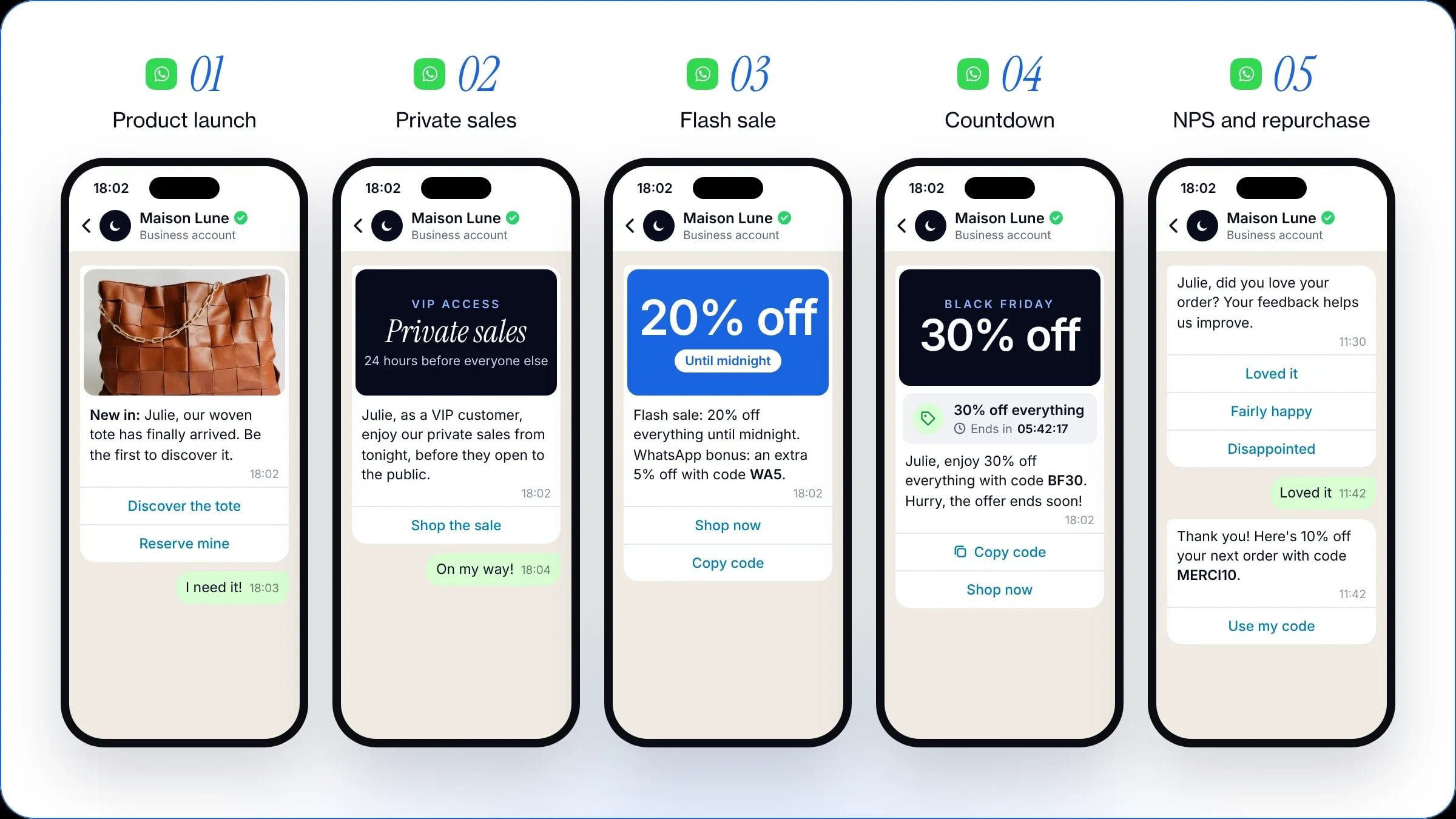
New product launch
Unveiling a new product directly on WhatsApp turns it into a real event. You mobilise an engaged audience and immediately drive qualified traffic to your store.
Early access and private sales
A sense of privilege remains one of the most powerful levers of engagement. By giving your WhatsApp community early or exclusive access to your products, you reward your best customers and increase your conversions. It is the ideal campaign to convert the strongest purchase intent.
Flash sales
Create a sense of urgency with a limited-time offer to trigger immediate purchases and spark a conversion peak. You can also make your WhatsApp campaign more attractive by playing on exclusivity, for example with an extra promo code for your WhatsApp channel for a limited time.
Promotional countdown
Keep your customers’ attention throughout your sales event by creating new buying opportunities at every stage: start with a teaser, then send a promo code, and close the event with a gift or an exclusive discount. For example, Cyber Monday after Black Friday is a sure way to convert latecomers.
NPS survey and repeat-purchase offer
Turn satisfied customers into regular buyers by offering them a perk on their next order. It is also a way to collect precise feedback from your users to improve their experience. For example, you can run a campaign for your VIP customers to adjust or refine an offer.
On the WAX platform, you can also automate this mechanic to send a message after every purchase.
Why do WhatsApp campaigns outperform email and SMS?
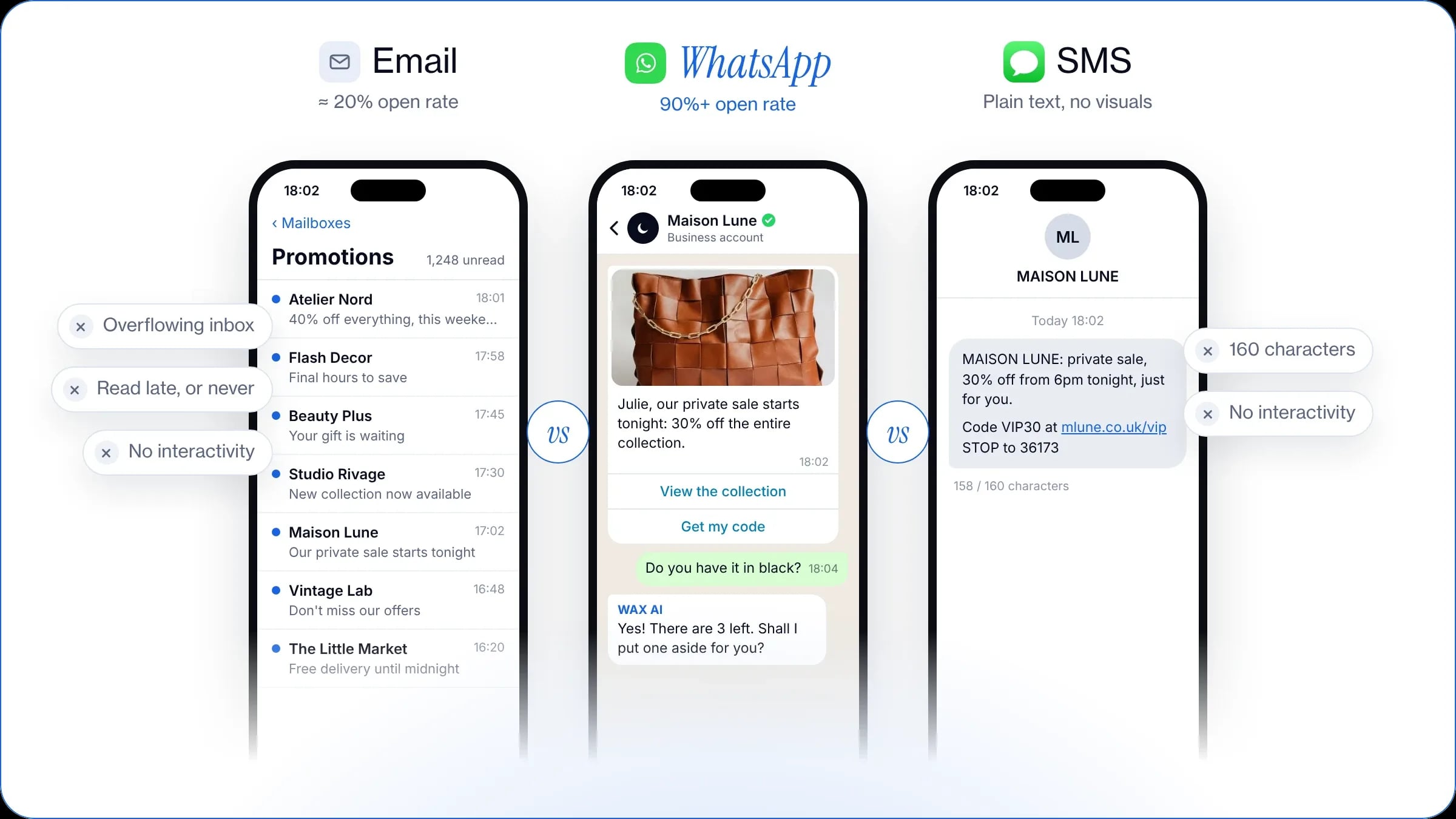
WhatsApp vs email: capturing the recipient’s attention
With inboxes saturated and email open rates sometimes struggling to pass 20%, WhatsApp offers unmatched visibility. With an average open rate above 90% and messages read within minutes of arriving, the messaging app is ideal for capturing your customers’ attention.
Above all, WhatsApp is a conversational channel. Unlike email, which is often one-way and top-down, it creates a direct, instant and interactive dialogue that brings you closer to your customers and makes them more responsive.
WhatsApp vs SMS: richer exchanges and a more human relationship
SMS is limited to 160 characters, with no visual identity or interactivity. A WhatsApp campaign, by contrast, relies on rich formats to maximise click rates: photos, videos, action and quick reply buttons.
WhatsApp also opens the way to genuine two-way conversations. Your customer can ask a question, be guided in real time and clear up any doubts before checking out, for far greater engagement and much stronger sales results.
Traditional chatbots primarily answer customer questions. WAX combines customer data, campaigns, automation, commerce and AI across the customer journey to help brands engage customers, drive purchases, build retention and provide customer support.