With WhatsApp ads, your brand can finally start a conversation with people who don’t know it yet.
Until now, WhatsApp has been a CRM channel: marketing campaigns for key moments, marketing automations for an abandoned cart or an order update, always for customers you already have.
Click-to-WhatsApp ads change that: on Facebook or Instagram, the “WhatsApp” call to action opens a chat with a prospect who is discovering your brand. They ask their question, become an opted-in contact, and WhatsApp finally bridges acquisition and CRM.
Since late September 2026, Meta gives you up to 7 days of free messaging to win them over. This guide shows you how to build these ads, welcome every prospect in WhatsApp and turn those 7 days into sales.
What is a Click-to-WhatsApp ad?
A Click-to-WhatsApp ad is a Facebook or Instagram ad whose call to action opens a WhatsApp conversation with your brand. It is created in Meta Ads Manager and works with several campaign objectives: awareness, traffic, engagement, leads or sales. Choose the one that serves what the campaign has to deliver.
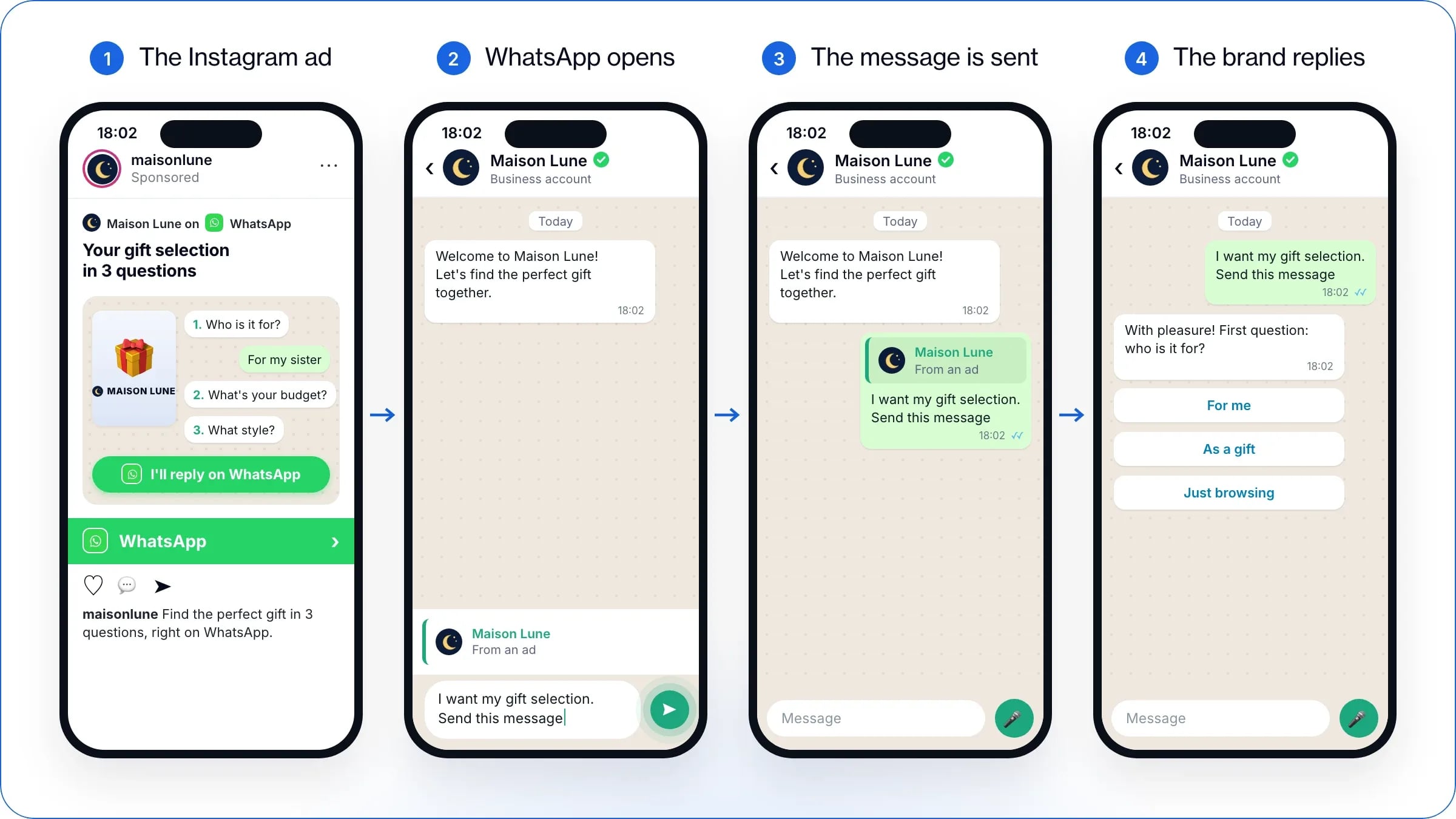
The Click-to-WhatsApp journey in 4 screens, from the Instagram ad to the brand’s reply.
For many of your customers, this journey is still a first. It happens in four steps:
The person sees your ad in their Facebook or Instagram feed and taps the “WhatsApp” call to action.
WhatsApp opens on a chat with your brand. Your greeting is waiting, with either a text already typed in the message bar (the pre-filled message) or questions to send in one tap (icebreakers).
They send that message. This first message creates the conversation: without it, nothing happens.
Your journey takes over: questions to understand their need, a product selection, replies from AI or an adviser, all the way to purchase, in the same chat.
Free
Get a Click-to-WhatsApp ad designed for your brand
Share your website: our experts will design an ad that fits your brand and email it to you.
WhatsApp advertising: three levers not to mix up
“WhatsApp advertising” often covers three very different levers. Telling them apart means knowing which one to pull:
The three levers of WhatsApp advertising
Lever
Where the brand appears
Who it reaches
What it is
Click-to-WhatsApp ads
Facebook and Instagram: Feed, Stories, Marketplace
Audiences targeted with Meta’s advertising tools
Paid ad outside WhatsApp that leads to WhatsApp
Ads in the Updates tab
WhatsApp Status and the channel directory
WhatsApp users, targeted with limited data
Paid ad inside WhatsApp, rolled out gradually in the European Union since 2026
Marketing messages
WhatsApp chat with the brand
Only contacts who have agreed to your messages
Paid message, not advertising in the strict sense
This guide focuses on the first lever, the easiest one for an e-commerce brand to activate today. Ads in the Updates tab have their own section at the end of the article.
What are the benefits of Click-to-WhatsApp ads?
An ad that leads to WhatsApp opens a conversation, not a page. That is its first benefit: the prospect asks their question at the very moment they are interested, your brand replies, and the sale can close in the same thread.
Your customers are waiting for exactly that. The “State of Business Messaging” study (Kantar for Meta, 11,056 people in 22 markets, 2025) shows it:
73.3% of consumers prefer to message a business;
72.4% are more likely to buy from a brand they can reach by message;
74.6% trust a business more when they can message it.
WhatsApp then becomes the best destination for two profiles your website converts poorly:
Prospects weighing up a purchase. They are torn between two models, unsure about the size, wondering about delivery. On the website, they search alone, then leave. In WhatsApp, their question opens an exchange that clears the doubt.
People who don’t know your brand yet. The conversation becomes their first visit: they discover your world, your products and your service before their first purchase.
The format adds three strengths of its own:
New: 7 days to convince. Since late September 2026, everyone who enters a brand’s WhatsApp conversation from an ad opens 7 days during which the brand can message them for free and follow up as often as it likes.
A clearer intent than a click. Writing to a brand takes a little effort: those who do it arrive with a specific question.
A richer exchange than a page. Photos, videos, product links, prices and basket: the conversation alone replaces several pages of the website.
When should you stick with an ad to your website?
When the purchase is already decided. An ad to the website keeps the edge for a simple, inexpensive product bought without a second thought (a consumable, a refill), by someone who already knows the brand and knows what they want. But as soon as the purchase calls for advice, personalisation, an appointment or a large basket, the conversation takes over.
The ad still has to make people want to write. That is where it all happens.
How do you run a successful WhatsApp ad?
At WAX, we have supported dozens of Click-to-WhatsApp campaigns. Here is what we have learnt: a successful ad comes down to three moments, in this order. The ad creative announces WhatsApp and makes people want to click; the redirect keeps those who clicked, because that is where some drop off; and the welcome in WhatsApp turns the first message into a relationship. One weak link, and the prospect leaves.
How do you design an ad creative for WhatsApp?
The ad creative is probably what explains why many brands’ first tests were disappointing: they reused creatives designed for ads that lead to the website. Yet the Click-to-WhatsApp ad is still a new format in acquisition, and prospects are not used to being sent to WhatsApp. Tapping the call to action must not surprise them, or they close the redirect straight away. The ad’s visual and text must make it obvious that what comes next happens in WhatsApp, so that the people who click are willing and ready for the redirect.
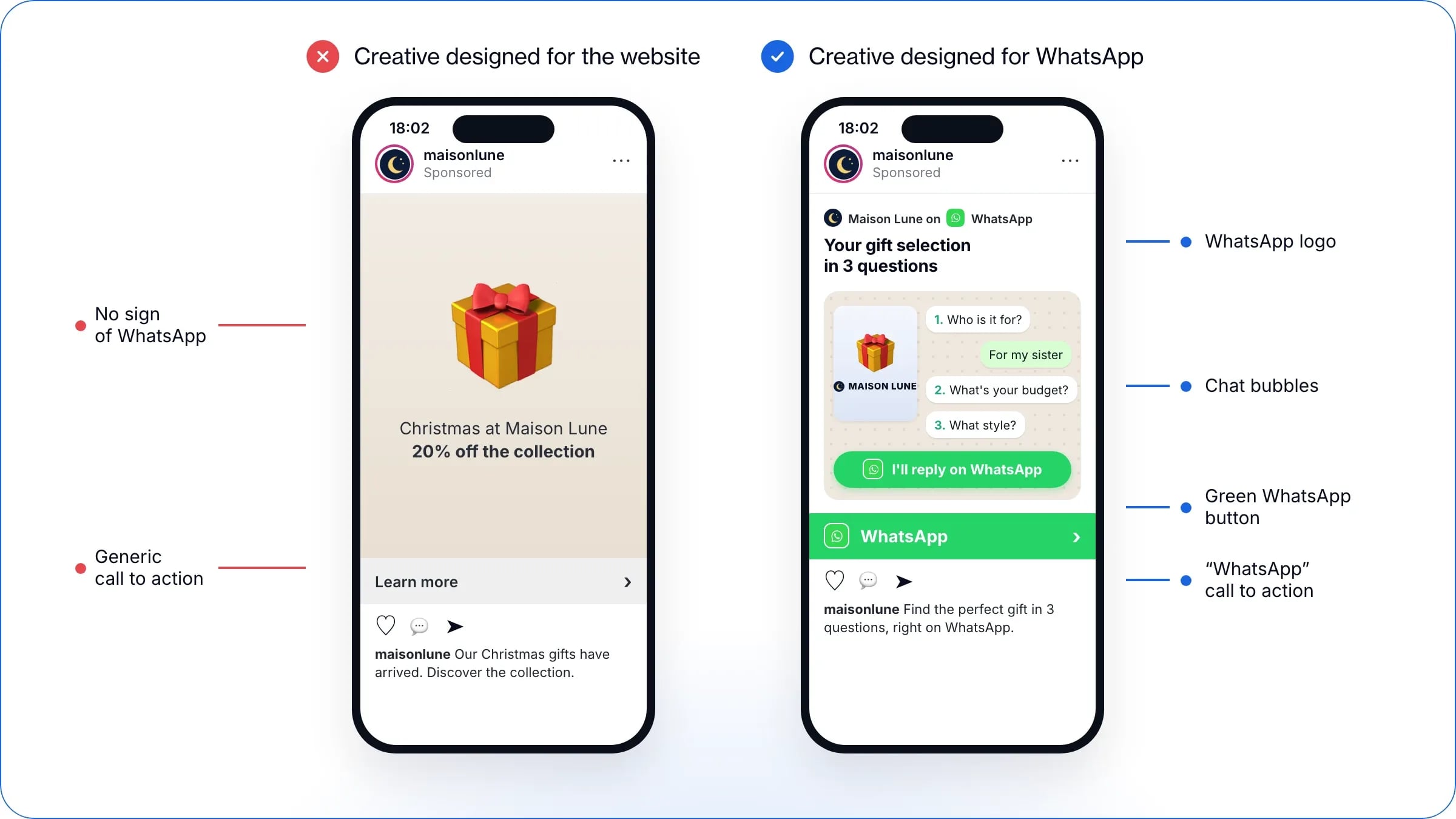
On the left, a creative designed for the website; on the right, the same offer designed for WhatsApp.
Borrow WhatsApp’s visual codes. Your ad creative should announce the experience that follows. So borrow the app’s codes: the WhatsApp logo, of course, but above all chat bubbles. They mimic the exchange and prepare the redirect (“Your selection is ready”, “You’re signed up for the early access”). And show the product, not just your logo: that is what makes people want to talk about it.
Give people a good reason to go to WhatsApp: that is the angle of the ad. Adding a redirect to WhatsApp to a standard ad is not enough. Nobody writes to a brand without a reason, and that reason needs work: it is the angle of your ad. Offer a service that a conversation delivers better than a page:
a gift guide: “Your gift selection in 3 questions”;
a guided selection: “The right jumper, the right colour: we’ll help you on WhatsApp”;
early access: “Sign up on WhatsApp for early access to the sale”;
a beauty diagnosis: skin type as icebreakers (“Dry skin”, “Combination skin”, “Sensitive skin”), then a tailored routine;
fashion size advice: “Find your size on WhatsApp”.
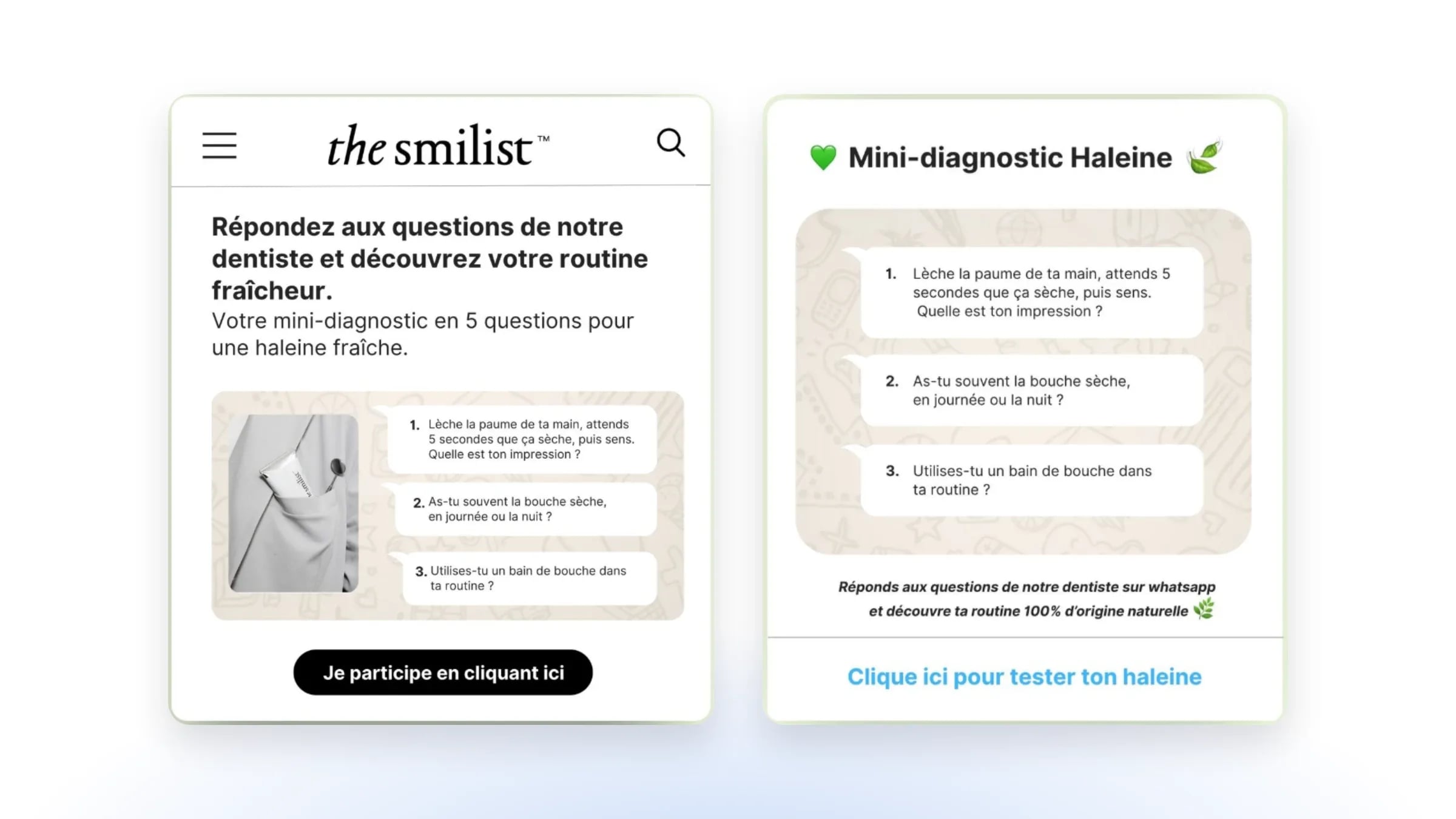
Examples of ad creatives from WAX customers
Oral care brand The Smilist offers a “breath” mini-diagnosis led by its dentist. The questions appear in chat bubbles, on WhatsApp’s distinctive chat background, and the invitation to reply on WhatsApp closes the creative.
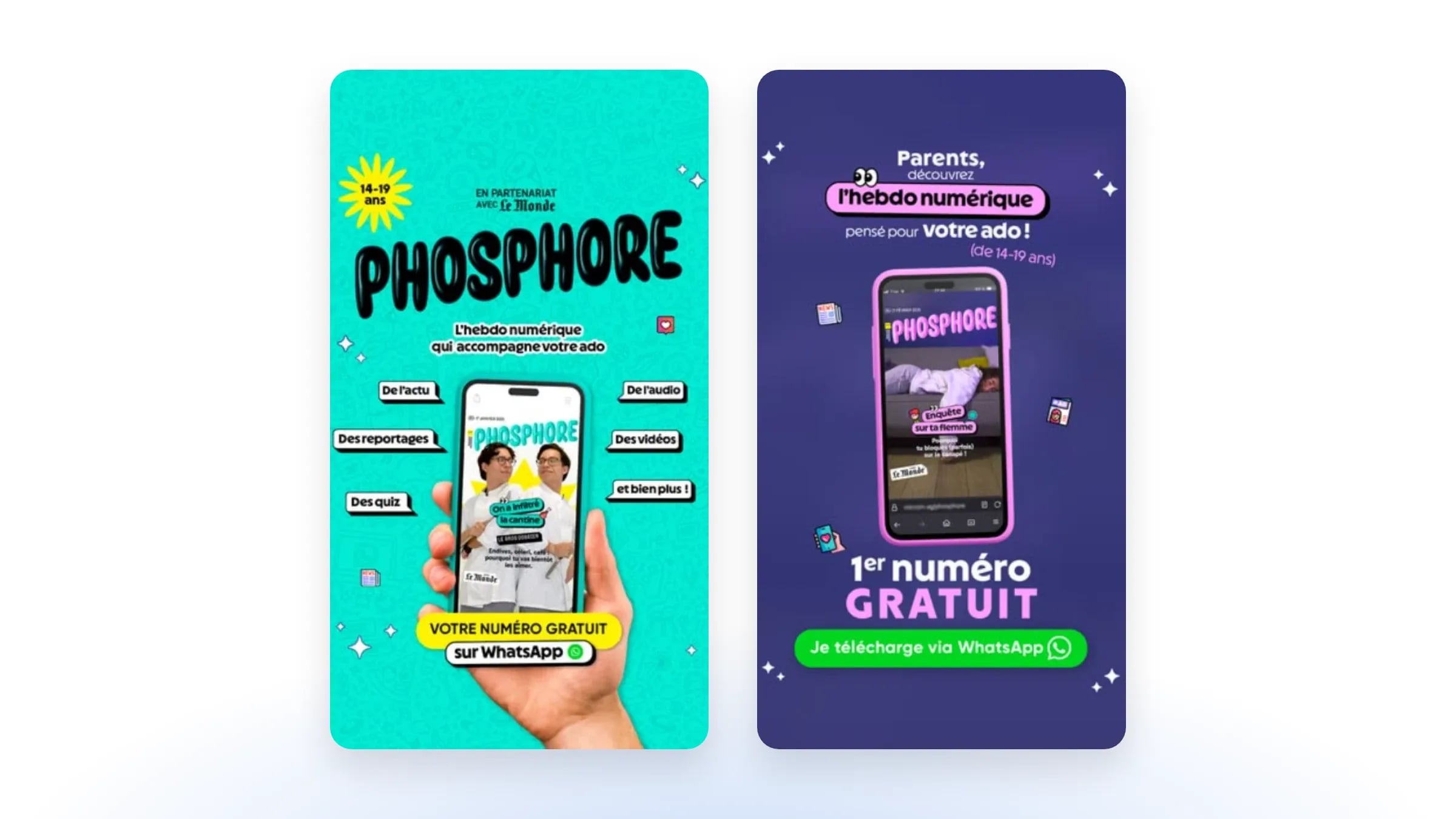
Phosphore, the digital weekly for 14 to 19-year-olds in partnership with Le Monde, runs two creatives: one for teenagers, the other for their parents. Both announce WhatsApp right down to the call to action, with the app’s logo and green: “Your free issue on WhatsApp”, “I’ll download it via WhatsApp”.
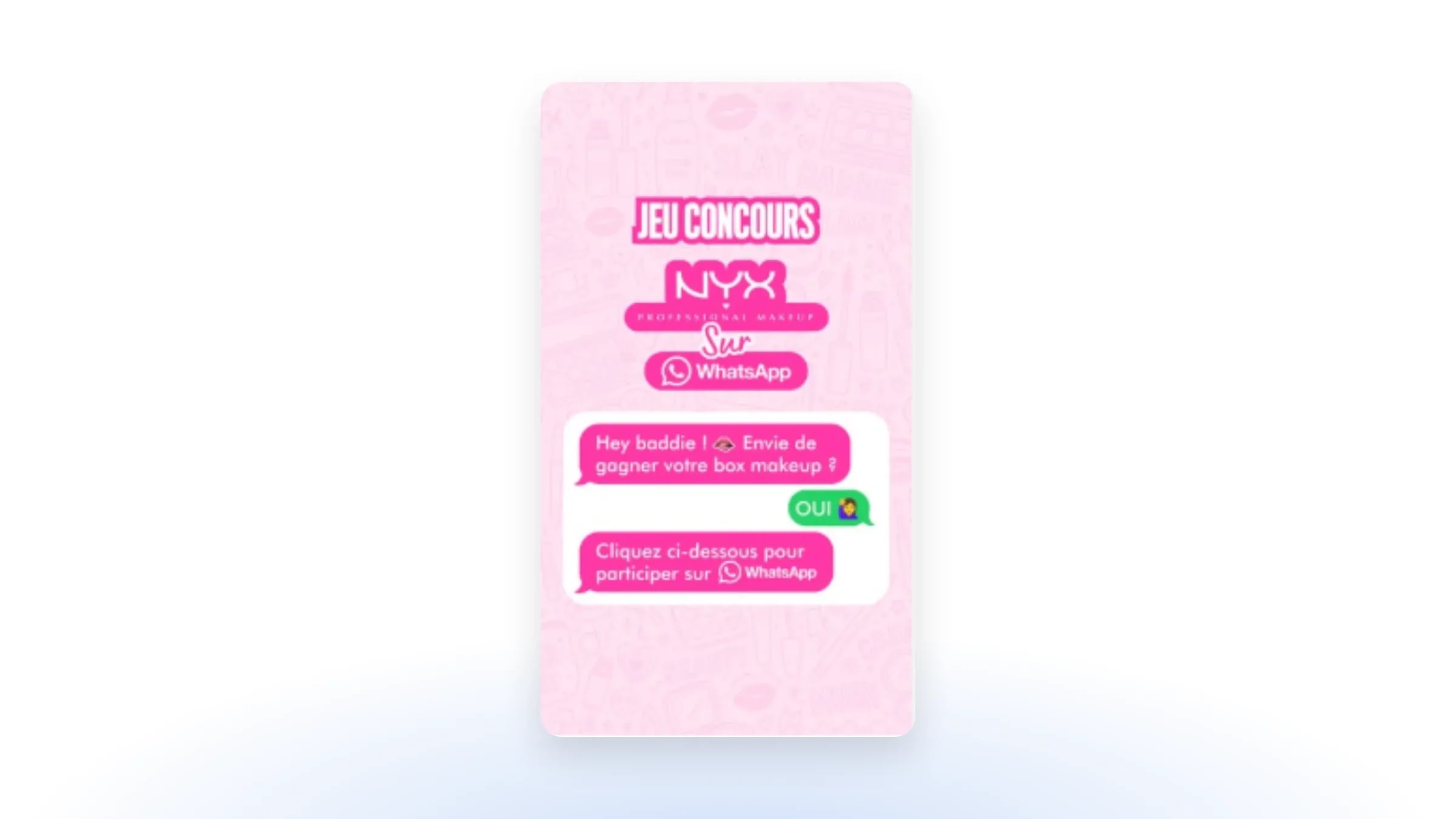
NYX Professional Makeup announces a competition “on WhatsApp”, logo included, then stages the conversation to come: “Fancy winning your makeup box?”, “Yes”, and finally “Click below to enter on WhatsApp”.
More tips to optimise your ad creative
Write the text like a personal message. In the same Kantar study for Meta, 75.1% of consumers want to chat with businesses the way they chat with friends and family. So talk like them: in the primary text, use the customer’s words and a specific concern (“Torn between two sizes?”) rather than a slogan. Short sentences, one promise per ad.
Keep the call to action short and consistent. The headline says what the person gets by writing (“Your gift selection on WhatsApp”). And the promise is kept: if the ad announces 3 questions, the welcome asks 3.
Choose the format: image, video or carousel, on Facebook as on Instagram (placements are detailed below).
Test 2 or 3 variants, changing only one variable at a time: visual, hook or pre-filled message. Then compare them on cost per conversation started, not on click-through rate: a click doesn’t tell you who actually wrote.
How do you optimise the redirect to WhatsApp?
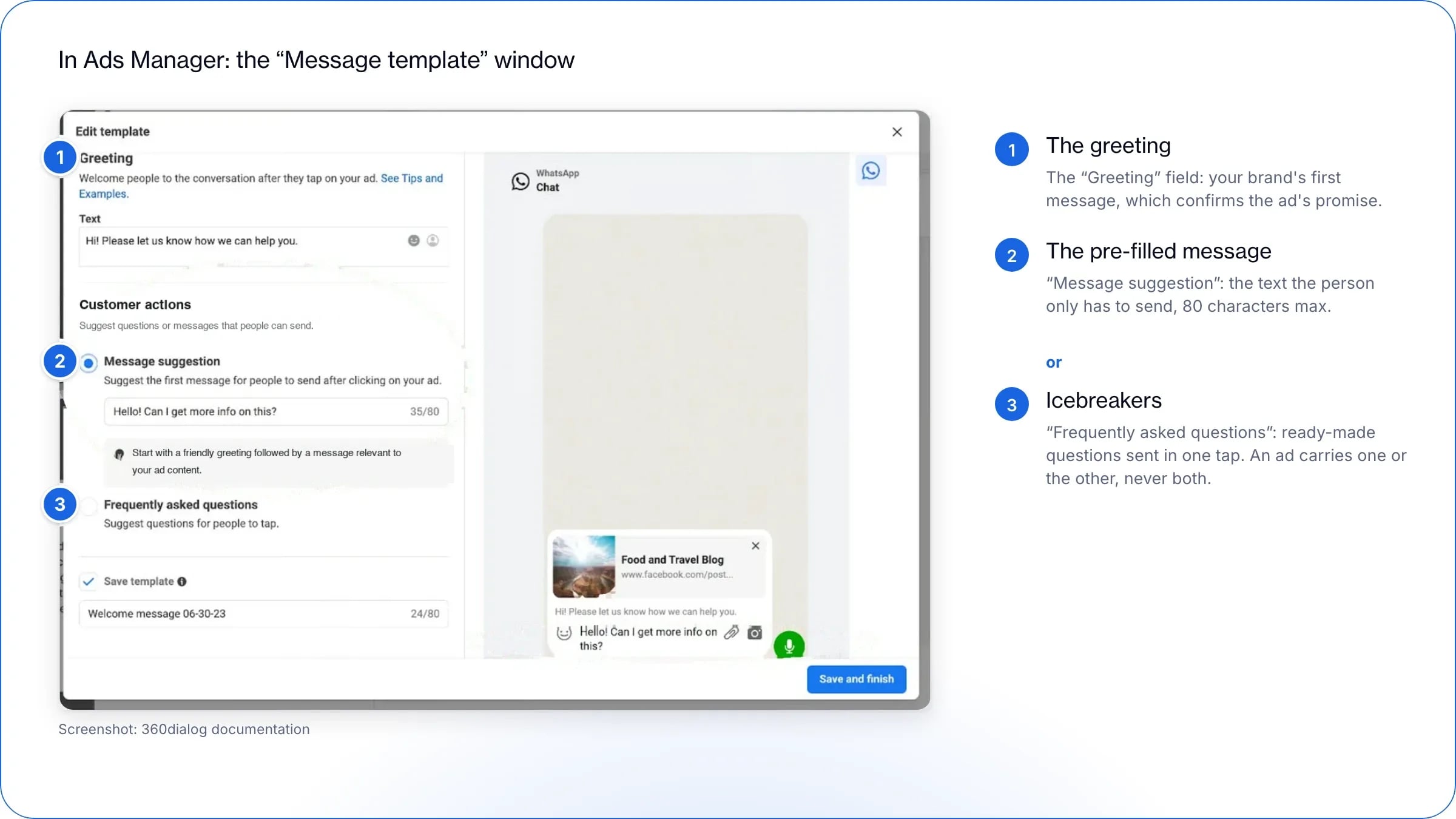
When someone taps the “WhatsApp” call to action, the chat with your brand opens. What they find there should leave nothing to chance: it is all set in the ad’s welcome sequence, in Ads Manager, at ad level, in the “Message template” section (the “Start a conversation” template). It has three elements: a greeting and either a pre-filled message or icebreakers.
1. The greeting. It is your brand’s first word. It confirms the ad’s promise (“Welcome! Let’s find the right gift together”): the person knows straight away that they are in the right place.
2. The pre-filled message. A text already typed in the message bar: the person only has to send it. It says what they will get, “I want my gift selection”, “Sign me up for early access”. A vague text like “Hello, I have a question” makes people much less likely to send it.
3. Icebreakers. Ready-made questions the person sends with a single tap (“It’s a gift”, “Which size would you recommend?”, “How long does delivery take?”). They are set up in the ad’s welcome sequence or on your WhatsApp account: 4 questions at most, 80 characters, no emoji.
Pre-filled message or icebreakers: you have to choose. An ad carries one or the other, never both. And don’t count on your WhatsApp account’s icebreakers to take over: WhatsApp hides them as soon as a text is pre-filled. The rule is simple. Your ad carries one clear promise (gift guide, early-access sign-up)? Go for the pre-filled message. Your prospects arrive with all sorts of questions? Choose icebreakers. Finally, give each ad its own sequence: from the first message, you will know which campaign the conversation comes from.
How do you welcome prospects in WhatsApp and guide them to purchase?
The pre-filled message has been sent: your welcome journey starts. Your first reply must follow immediately. It is this reply, sent within 24 hours, that opens the 7-day free window, and a reply within seconds keeps the prospect interested.
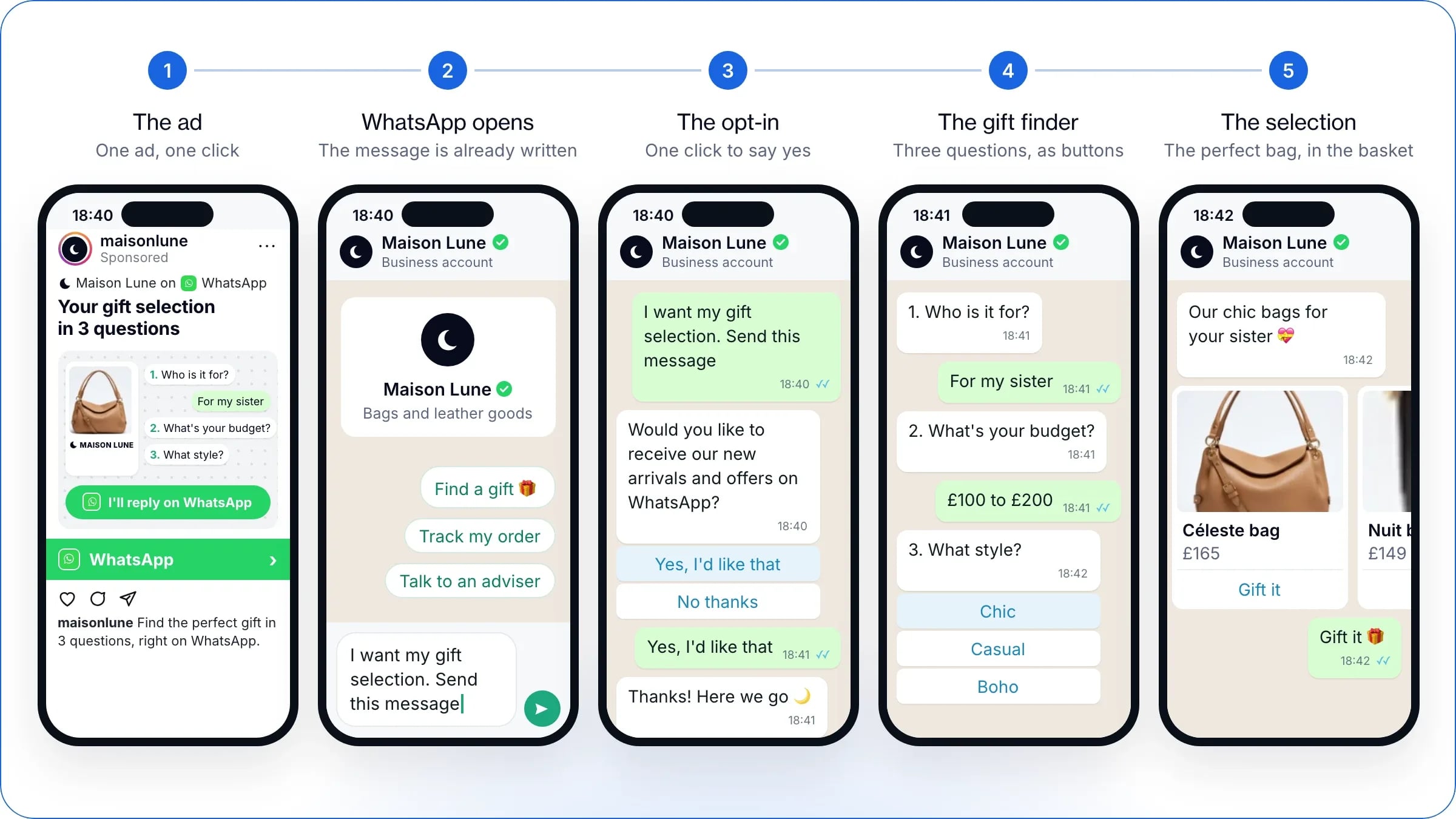
From ad to basket: the Maison Lune welcome journey, a fictional brand, in five screens.
Keep the ad’s promise and give them a reason to stay. Your prospect should always have a good reason for coming to WhatsApp. If the ad promises a selection, the first message starts it, without detours.
To reply, you have four options. The first two are the most effective: choose between them according to your ad’s angle.
The four ways to reply to prospects who arrive from an ad
Option
What it brings
Good to know
1. AI alone
Answers every question, advises and steers towards purchase, at any time, then hands over to a person if needed
Ideal when the ad opens on all sorts of questions: advice, size, delivery
2. A scripted journey + AI
The journey qualifies and leads to a selection; the AI answers open questions, at any time, and hands over to a person
Ideal when the ad promises a specific experience: gift selection, diagnosis, sign-up
3. A scripted journey alone
Qualifies and leads to a selection, 24/7
Gets stuck as soon as the question goes off script
4. A salesperson, no automation
Human advice
Not always there in the evening, at weekends or during the peaks that follow a new ad creative, when the first reply has to go out straight away
What the scripted journey + AI brings together. You guide the customer through an experience built around your ad’s angle: if the ad promises a gift selection, the journey asks the questions that lead to it. This experience is first built as a conversational journey, with multiple-choice questions (who it is for, what budget, what style) and sharing whatever moves the purchase forward (lookbook, the campaign’s promo code, payment link). To collect closed information, such as a size, an appointment date or an email address, a WhatsApp Flow can complement this journey, without replacing it. On questions that go beyond the journey, WAX AI takes over.
Ask for WhatsApp opt-in during the welcome. The message sent from the ad lets you reply and chat. To follow up later on your own initiative, Meta requires an opt-in that clearly tells the person they agree to receive your messages. The timing is ideal: the person has just written to you. Offer to send them your new arrivals and offers on WhatsApp, with a “Yes” button and a “No thanks” button. You will be able to keep writing to them after the 7 days, to receptive contacts: fewer unsubscribes, and a better quality rating. We recommend separate opt-ins per channel: if the person unsubscribes from one, you keep the others.
Don’t count every chat as a lead. A “hello” with no follow-up isn’t one. Qualify the conversation before counting it: your figures will tell the truth.
Example of a welcome journey (scripted journey + AI), for a fashion brand before the festive season:
Ad: visual with the WhatsApp logo and a bubble saying “Your gift selection in 3 questions”. Pre-filled message: “I want my gift selection. Send this message”.
Message 1: “Welcome! We’ll help you find the right gift in 3 questions. Who is it for?” Buttons: For me, As a gift, Just browsing.
Message 2: “What’s your budget?” Buttons: Under £100, £100 to £200, Over £200.
Message 3: a carousel of four matching products, then “Would you like to receive our new arrivals and offers on WhatsApp?” Buttons: Yes, No thanks.
At any time: an open question (“Does it run large?”) gets its answer from the AI, or goes to an adviser.
The following days (opted-in contacts): the follow-ups detailed in the next section.
How do you follow up with prospects during the 7 free days?
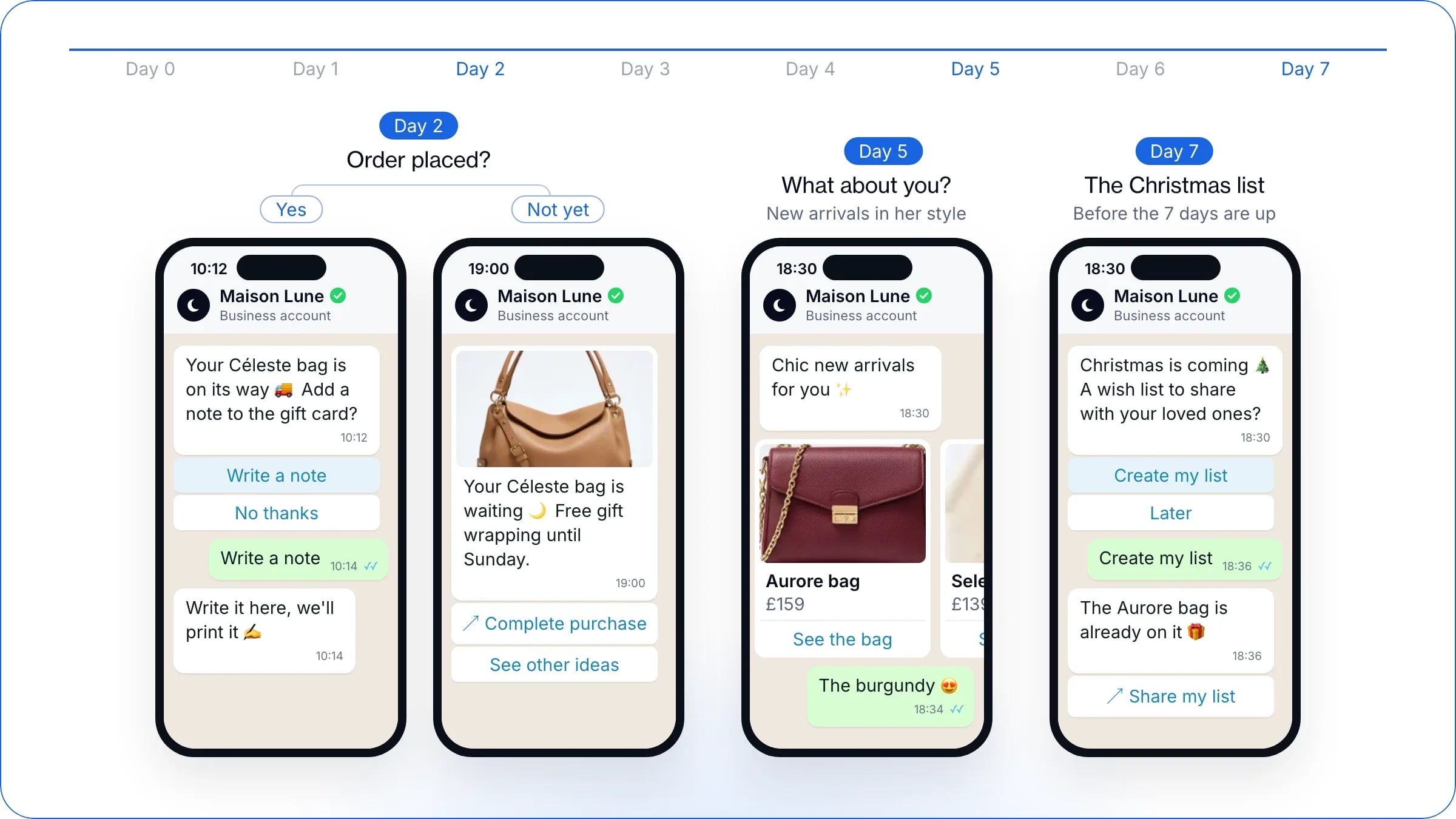
This is the format’s great strength: once the person has entered the conversation from your ad, you can message them for free for 7 days. For a week, the brand guides them to purchase without paying for messaging. The method comes down to three moves: reply within 24 hours to open the window, send your opted-in contacts a short sequence (a message matched to their order, new arrivals that suit their style, one last reason to come back), and adapt it as soon as they buy.
Three follow-ups over the 7 free days, matched to what the contact did, for Maison Lune, a fictional brand.
What are the conditions of the 7-day free window?
Until late September 2026, the free window opened by an ad lasted 72 hours. It now extends to up to 7 days, on the following conditions:
the person messages you from a Click-to-WhatsApp ad, from the WhatsApp app on Android or iOS: the desktop and web versions don’t open the window;
you reply within the 24-hour customer service window. This reply is free and opens the free window (the “free entry point”), which runs from your reply;
the window stays open for up to 7 days. Marketing, utility, authentication and service messages are free in it; only messages from Meta’s AI agent (Meta Business Agent) are still charged by Meta;
the free messaging only covers Meta’s messaging fees: WAX AI replies are still charged, like any service of your messaging platform.
Free doesn’t mean without rules. After 24 hours without a new message from the person, your follow-ups go through templates approved by Meta. And marketing messages only go to contacts who have agreed to receive them.
Which messages should you send during the 7 days?
No need to overdo it: a simple sequence is enough, kept for contacts who have accepted your messages.
Day 2: a message based on the order. If the person ordered, extend the experience: offer to add a note to the gift card. If not, remind them of the product they chose with a reason to buy now, such as free gift wrapping until Sunday, and a button to complete the purchase.
Day 5: “And for you?” New arrivals chosen to match the style given during the welcome.
Day 7, before the window closes: one last reason to come back, such as a Christmas wish list to share with friends and family.
Automate these follow-ups at fixed intervals (D2, D5, D7). As soon as the person buys, stop talking about the product they ordered; if they ask not to be contacted, stop everything. You can also message everyone who came from the same ad in a single send: those from the “gift guide” ad get the end-of-offer reminder, those from the “early access” ad get the sale opening.
One last reflex, especially in the run-up to Black Friday: better fewer contacts who are receptive than many contacts followed by unsubscribes. To write to your whole base afterwards, you need a good quality rating.
How do you retarget prospects directly in WhatsApp?
By segmenting according to what each person did in the conversation. Every answer, every click and every basket tells you where the prospect stands: your follow-ups adapt to their behaviour, without going through a new ad.
Follow-ups according to what the prospect did
What the prospect did
What you send them
Wrote, then stopped replying
A short follow-up that echoes the ad’s promise (“Your gift selection is waiting for you”)
Answered the questions without opening the selection
A carousel narrowed down to two or three products, with a customer review
Added a product to the basket without ordering
A basket reminder, then an answer to the most common objection (size, delivery, returns)
Ordered
The end of sales follow-ups, time for order updates and, later, the complementary product
Declined the opt-in
No marketing follow-ups: you only answer their questions
Cross these segments with the ad each conversation came from: someone who arrived via the “gift guide” ad doesn’t get the same message as someone who came for early access. Outside the 24 hours after their last message, your follow-ups go through approved templates, and marketing messages only go to opted-in contacts.
What are the limits of Click-to-WhatsApp ads?
The format has one main limit: some of the people who click on the ad never reach WhatsApp. Even when you apply all our recommendations on the ad creative, the pre-filled message and the welcome, this drop-off can reach 30 to 40%. It doesn’t call the format into question, but it justifies testing it against Meta’s lead form ad before rolling it out.
Why do some clickers never reach WhatsApp?
Click-to-WhatsApp is still a recent format in acquisition, and your prospects are used to clicking through to a website or filling in a form. Between the click and the first message, three steps lose some prospects: the app opening, which can surprise them, the confirmation requested on Android, then the pre-filled message to send. Our recommendations reduce this loss significantly, without removing it entirely.
How do you test the format? The 50/50 method recommended by WAX
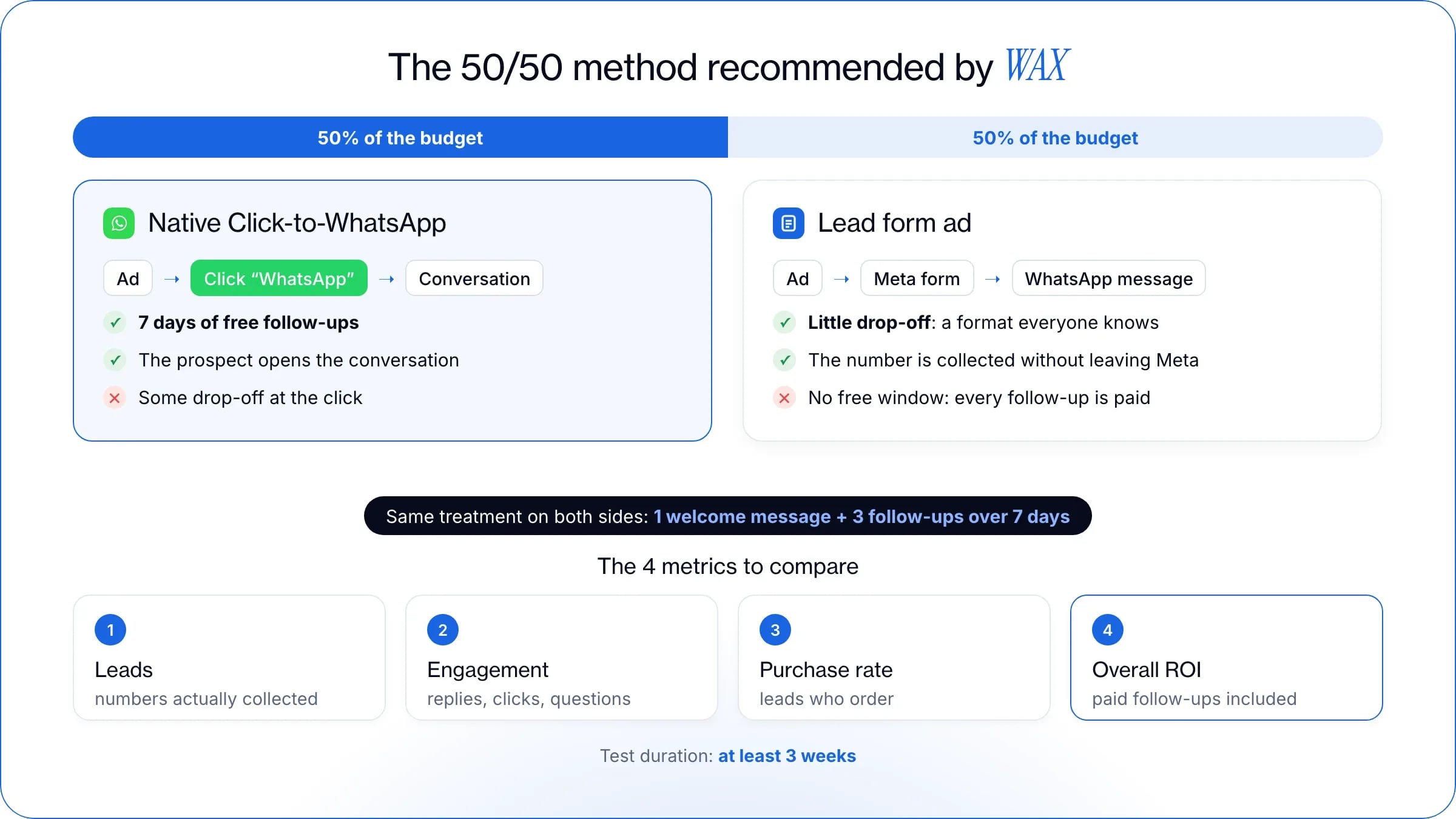
At WAX, we recommend a simple method to customers testing the format: put half the budget into native Click-to-WhatsApp, and the other half into Meta’s lead form ad.
Two halves of the budget, the same treatment, four figures to decide.
Native Click-to-WhatsApp, as described in this guide: the “WhatsApp” call to action opens the conversation, and you use the 7 free days to follow up. In return, you accept some drop-off at the click.
The lead form ad, a classic lead generation ad: the person leaves their number without leaving Facebook or Instagram, and the brand then writes to them on WhatsApp. Everyone knows the format and drop-off stays low. But these contacts don’t open any free window: every follow-up is charged, which often leads brands to follow up less, and weighs on return on investment.
Run the test for at least 3 weeks. For a fair comparison, treat both halves exactly the same way: a greeting on arrival, then three follow-ups spread over the next 7 days, identical on both sides. The form can also be done in two steps: email first then phone number, or the other way round, depending on which channel converts best for you.
Which metrics should you compare to decide?
At the end of the test, compare the two halves on four figures:
The number of leads: the phone numbers actually collected by each format.
The engagement rate in WhatsApp: who replies, who clicks, who asks a question.
The purchase rate: the share of leads who place an order.
Overall ROI: the revenue generated against the total cost, ad budget and paid follow-ups included.
You will then know whether to move to 100% Click-to-WhatsApp or whether, for now, drop-off still holds back the native format and the form remains the best option.
How do you create a Click-to-WhatsApp ad in Ads Manager?
Link a WhatsApp Business account to Meta, then create the campaign in Ads Manager: objective, WhatsApp destination, audience and budget, ad creative and message template.
What do you need before you start?
Two prerequisites, no more:
A WhatsApp Business account, created with the WhatsApp Business app or via the WhatsApp Business API (the platform used by tools such as WAX).
A link between this account and Meta: connect the WhatsApp number to the business’s Facebook Page, which you must be an admin of, or add it to your business portfolio. How to do it: connect your Facebook Page and WhatsApp.
On the WhatsApp side, you prepare the ground with WAX: complete business profile (name, opening hours, address), up-to-date catalogue, greeting and tracking per campaign.
How do you set up the campaign, step by step?
For a Traffic, Engagement or Sales objective, allow eight steps:
Open Ads Manager and click “Create”.
Choose the objective and name the campaign in a structured way (product, audience, date).
In the “Conversion” section, select “Message destinations”.
Choose the Facebook Page: the WhatsApp number linked to it will be the campaign’s number.
Tick “WhatsApp” among the destinations. If the option is unavailable, click “Connect account”, select the country code and enter your number.
Set the performance goal, budget, schedule and audience (guidelines below), then move to ad level.
Choose the format, upload the creative, then create or reuse a “Message template”.
Review everything, then publish.
Which placements, audience and budget?
Your Click-to-WhatsApp ads appear on Facebook and Instagram, in Feed, Stories and Marketplace. For the Leads and Sales objectives, Advantage+ audience and placements (Meta’s automated delivery) are switched on by default.
Audience: keep Advantage+, refine the location and go broad, at least 2 to 10 million people.
Duration: at WAX, we recommend running an ad for at least 3 weeks, and extending the one that works rather than creating a new one.
Budget: an amount per day or for the length of the campaign, which you can change at any time.
But this budget is only part of the bill.
How much does a Click-to-WhatsApp ad cost?
A Click-to-WhatsApp ad costs you the delivery budget you set, the messages sent outside the free window opened by the ad and, where applicable, the subscription to your conversation management tool.
What you pay, line by line
Each line of the bill follows its own rule:
The cost of a Click-to-WhatsApp ad, line by line
Item
Rule
Ad delivery
Budget set by the advertiser (per day or for the duration), which can be changed at any time
Messages in the free window
Free for up to 7 days, for the marketing, utility, authentication and service categories (except Meta Business Agent)
Messages outside the window
Charged per message delivered, by country and category
Service messages
Since 1 October 2026, 1,000 free per month per number, then charged per message
Contacts from a Meta lead form
No free window: every WhatsApp message sent afterwards is charged
Conversation management tool
Depends on the provider
How long does ad review take?
Usually less than 24 hours. Every ad goes through a review against Meta’s Advertising Standards. Changing the targeting, the content or the optimisation triggers it again; changing the budget or the schedule doesn’t. So plan your creative adjustments ahead of a key moment.
Which rules apply in the conversation?
Once the conversation is open, the WhatsApp Business policy sets the framework:
An accurate profile, with customer service contact details, without impersonating another brand.
Opt-in for what comes next. Replying to someone who writes to you is allowed. Sending them messages later on your own initiative requires their consent and templates approved by Meta.
Respecting requests to stop, whether they arrive on WhatsApp or elsewhere.
With WAX, these rules are handled natively, and our teams help you comply with them and make each prospect’s arrival in WhatsApp as effective as possible.
How do you measure the results of your WhatsApp ads?
Measuring a WhatsApp ad means following the thread end to end: link each conversation to the ad that opened it, qualify it, then follow the contact through to the order. Four figures guide your decisions: cost per conversation started, cost per lead, cost per purchase and ROAS. You will then know which campaign sells, not just which one gets people talking.
Which metrics should you track?
Each metric sheds light on one step of the journey:
The metrics of a WhatsApp ad
Metric
What it measures
Where to find it
Conversations started / clicks
The loss between the click and the first message
Ads Manager, conversation tool
Cost per conversation started
The entry price of a chat
Ads Manager
Cost per lead
The price of a qualified or opted-in contact, not just a “hello”
Conversation tool, CRM
Time to first reply
The ability of the team or the AI to keep up
Conversation tool
Opt-in and unsubscribe rates
How committed the contacts you recruit really are
Conversation tool
Cost per purchase
The price of an order that came from the ad
Sales attribution
ROAS
The revenue earned per pound spent
Sales attribution
How do you spot conversations that come from an ad?
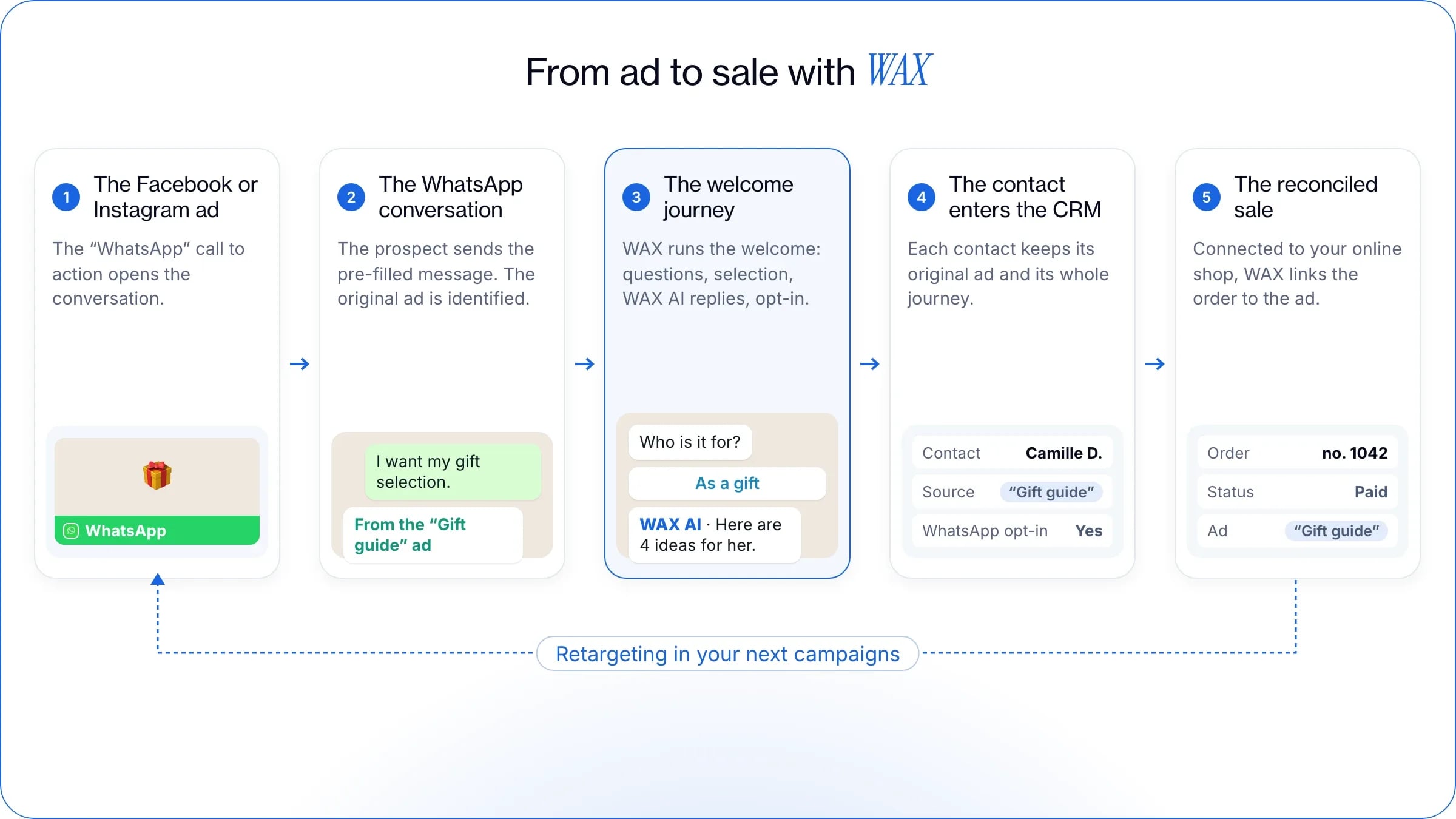
With the WhatsApp Business API, every conversation carries its ad’s signature. The first message sent from a Click-to-WhatsApp ad arrives with referral data: the ad’s ID and link, the source type (“ad”), the ad’s headline and text, the media type, the greeting shown and the click ID (ctwa_clid). Enough to tag each conversation by ad, and to follow up with everyone who arrived through the same campaign.
What WAX does. With WAX, everyone who arrives from an ad enters your CRM with the ad they came from. WAX runs the whole welcome journey, then you follow each contact through the funnel, from the first message to the order: replies, clicks, follow-ups, opt-in. Connected to your online shop, WAX sees who bought and reconciles sales directly with the ad that generated them. In your next campaigns, you then retarget these contacts according to how they interacted with your ads.
How do you link a conversation to a sale?
By sending each purchase back to Meta, and by signing each campaign on the shop side. The Meta pixel, the Conversions API and offline conversions pass on purchases: you measure cost per purchase and ROAS, and delivery learns to find profiles similar to your buyers.
Each conversation that comes from an ad keeps its source all the way to the order, then feeds your next retargeting.
On the shop side, give each campaign a unique marker: a promo code specific to the ad, a tracked payment link, a separate message template. You can then decide between two ad creatives, and between the “native” and “form” halves of the budget.
How do you optimise your campaigns?
With the first figures in hand, go back to the three reflexes that make a campaign progress:
Optimise for conversations, not for clicks: at WAX, we recommend the Leads objective, optimised for conversations started. Once tracking is in place, move to optimising for leads or purchases: Meta’s studies measure a 24% lower cost per lead and a 10% lower cost per purchase compared with optimising for conversations.
Let an ad run for at least 3 weeks before judging it: that is the period we recommend at WAX.
Test one variable at a time: ad creative, hook, audience or greeting.
Can you advertise inside WhatsApp?
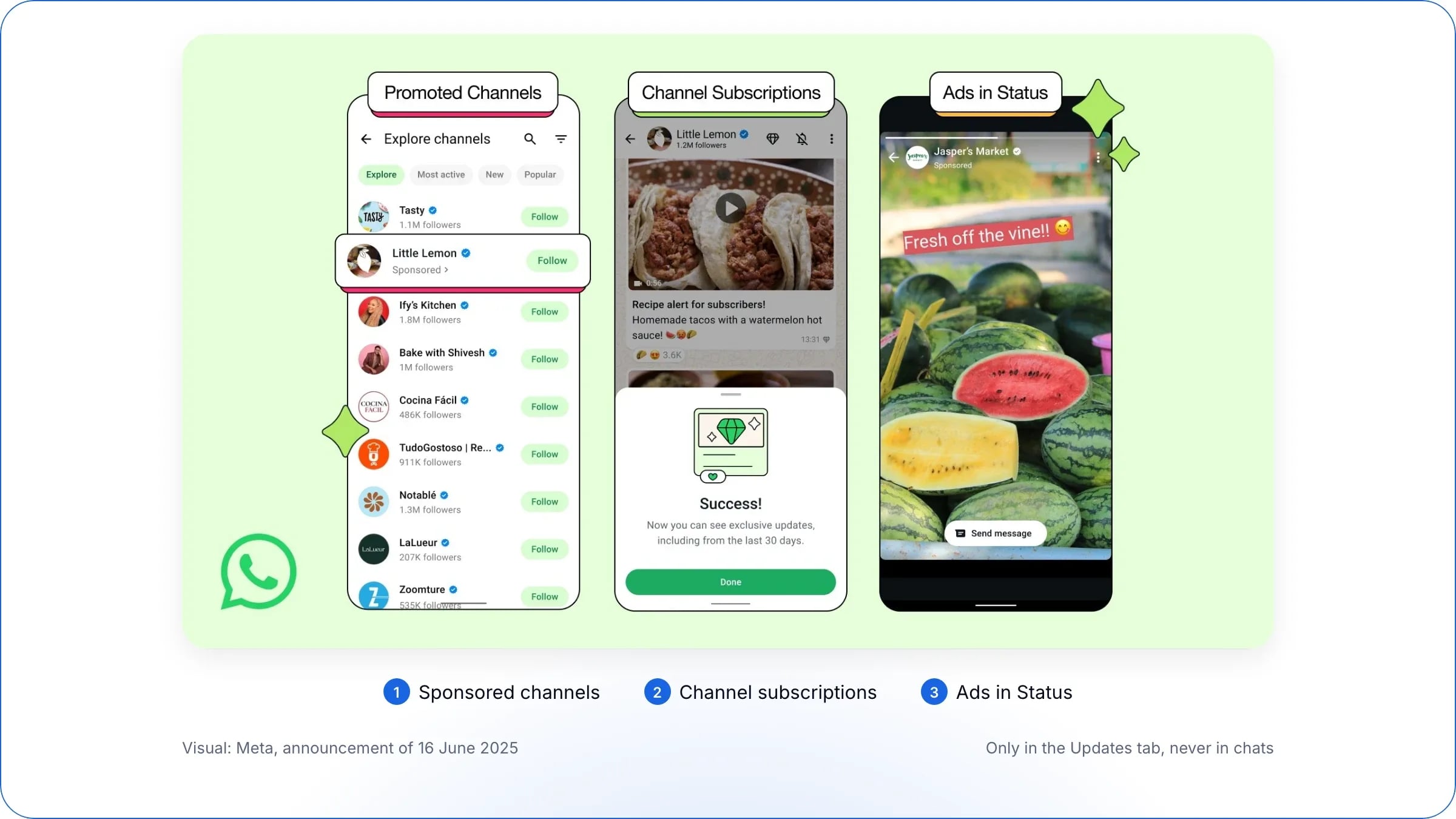
Yes, but never in your private chats: advertising in WhatsApp lives only in the Updates tab, with three formats announced by Meta on 16 June 2025:
Ads in Status, which start a conversation and are created in Ads Manager;
Sponsored channels, to gain followers in the channel directory;
Channel subscriptions, paid monthly, for exclusive content.
The three ad formats in WhatsApp’s Updates tab (visual: Meta, 16 June 2025).
Targeting relies on limited information (country or city, language, channels followed), never on personal messages. After a delay, these formats have been arriving gradually in the European Union since 2026, account by account: check in Ads Manager whether the “WhatsApp Status” placement is offered to you.
Frequently asked questions about WhatsApp ads
Three items: the delivery budget set in Ads Manager, messages sent outside the free window, charged per message, and the subscription to your tool, such as WAX. The cost per conversation depends on the audience, the competition and the ad creative. See “How much does a Click-to-WhatsApp ad cost?” above.
Yes, for up to 7 days since late September 2026, compared with 72 hours before, if the person messages you from the ad on the mobile app and you reply within 24 hours. Only messages from Meta’s AI agent are still charged, and contacts from a Meta lead form don’t benefit from it. See the conditions above.
The Leads objective, optimised for conversations started: Meta then targets people who actually write on WhatsApp, not just those who click. To secure your results, split the budget equally between the native ad and the Meta lead form, then compare their profitability. See the 50/50 method above.
No. An account created with the WhatsApp Business app works, as does an account via the API, as long as it is linked to your Facebook Page or your business portfolio. The API becomes useful as soon as several people reply, you automate replies or you link each conversation to its ad. See “What do you need before you start?” above.
With the WhatsApp Business API, every conversation from an ad carries the ID of the ad it came from. On the sales side: the Meta pixel or the Conversions API, and one promo code per campaign. With WAX, connected to your online shop, sales are reconciled directly with the ad that opened the conversation. See “How do you link a conversation to a sale?” above.
Your private chats stay ad-free: ads only appear in the Updates tab, and your personal messages are not used to target them (see “Can you advertise inside WhatsApp?” above). To stop receiving a brand’s messages, ask it to stop or block it: it must respect that request.
WAX is a conversational CRM for commerce that helps brands engage, convert, retain and support customers across WhatsApp, RCS and SMS. It connects customer, product and order data to personalised conversations, campaigns, automation and AI.
Traditional chatbots primarily answer customer questions. WAX combines customer data, campaigns, automation, commerce and AI across the customer journey to help brands engage customers, drive purchases, build retention and provide customer support.
WAX includes visual tools for building campaigns and automations without coding. Some integrations may call for technical input during setup.
Most brands launch WAX within two to three weeks, including channel verification and initial setup. Timelines depend on the channels, integrations and use cases required.
WAX supports WhatsApp, RCS and SMS from one conversational CRM, allowing brands to manage customer conversations across multiple messaging channels.
Yes. WAX AI can transfer a customer conversation to a human agent with the conversation context, allowing the customer service team to continue the interaction without starting again.
WAX integrates with leading platforms including Shopify, WooCommerce, Salesforce, Klaviyo, Attentive, Zendesk and Gorgias. WAX also supports API integrations and webhooks, allowing brands to connect custom and proprietary systems. These integrations bring customer, product and order data into conversations across WhatsApp, RCS and SMS.
WAX tracks metrics including opt-ins, engagement, conversion and attributed revenue, helping brands measure the performance of campaigns across WhatsApp, RCS and SMS.